
What is Employee-Level Spend?
In Crafty’s budgeting approach, cost-per-person-per-day is the foundation for building your pantry budget. We work from the bottom up by starting with the daily experience you want each employee to have, then factoring in headcount and working days to arrive at a budget that reflects how your pantry is actually used.
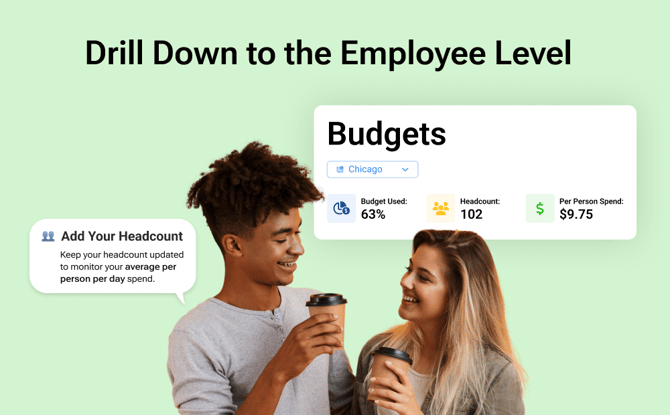
Headcount-Based Budget Tracking helps you carry that approach forward over time. By adding your headcount directly in the Crafty Platform, you can monitor cost per person per day in real time and see how changes in your team impact your budget. This visibility makes it easy to gut-check your experience and adjust with confidence as your team evolves.
How does Employee-Level Spend Help You Optimize Your Pantry?
Tracking spend on a per-person, per-day basis gives you a clearer way to understand whether your pantry is delivering the experience you intend, without relying on high-level monthly totals alone.
With this view, you can:
-
See how headcount changes impact your budget in real time
-
Compare actual spend against your budgeted targets
-
Make proactive adjustments to your assortment to ensure your experience is aligned
How do I Activate Per-Person Spend Tracking?
You can activate Per-Person Spend Tracking directly from the Budget page in the Crafty Platform by adding your headcount. Headcount is managed at the location level, so your per-person metrics accurately reflect how each office is using the pantry.
Add Your Headcount
-
Log in to the Crafty Platform
-
Click on Budgets on the left-hand side
-
Select a location in the dropdown
-
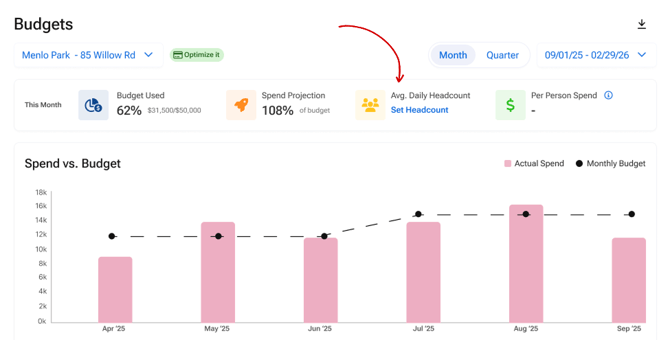
Under Avg. Daily Headcount, select Set Headcount
-
In the pop-up, fill in your estimated headcount for each day of the week, and the platform will calculate the average
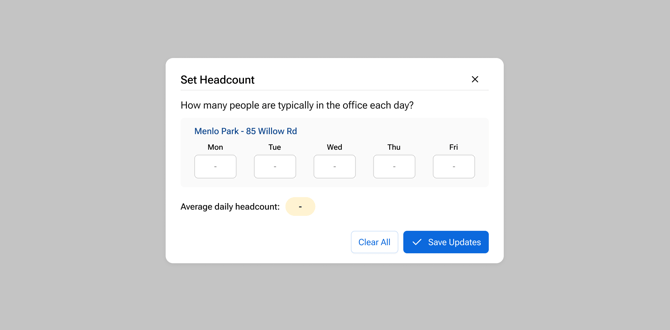
- Once complete, click Save Updates
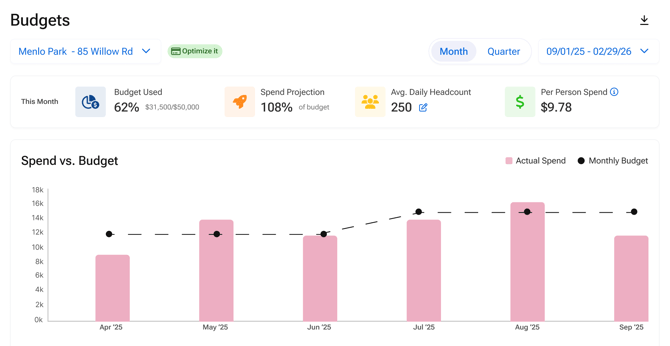
- You will return to the budget page, and you will now see your estimated per-person, per-day spend
How do I monitor my Per-Person Spend?
Once Per-Person Spend Tracking is activated, you can monitor it directly from the Budget page in the Crafty Platform. Your per-person, per-day spend updates whenever you make adjustments to your average headcount, and it also updates automatically as orders are placed. This gives you a real-time view into how your pantry budget is tracking at the employee level.
Monitor Your Per-Person Budget Month-Over-Month:
-
Log in to the Crafty Platform
-
Click on Budgets on the left-hand side
-
Select a location in the dropdown
-
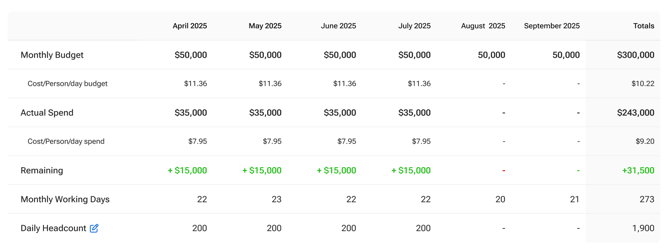
Below the spend vs. budget target, you'll find a chart that includes the following in a month-over-month view:
-
Cost/Person/Day Budget
-
Cost/Person/Day Spend
- Daily Headcount
-
When is Monitoring Per-Person Spend Most Helpful?
By keeping an eye on Per-Person Spend over time, you can make informed adjustments with confidence and ensure your pantry budget continues to support your team as it evolves.
This view can help when:
-
Your team is hiring, downsizing, or shifting attendance patterns
-
You need to gut-check whether your pantry experience is delivering the right value per employee
-
You want early visibility into potential budget overages before the end of the month
Common course-correction strategies include:
-
Increasing your budget as headcount grows to maintain a consistent experience, meet your per-person spend target, and keep pace with demand
-
Product swaps to introduce lower-cost alternatives while keeping variety intact
-
Eliminate low-performing items to rebalance spend toward products that are being consumed most
-
Merchandising strategies that influence how quickly certain items are consumed without removing them entirely
FAQs
What does Per-Person, Per-Day Spend include?
Per-Person Spend includes all pantry-related costs, including product, management fees, equipment, and taxes. It reflects your total spend divided by headcount and working days.
How often does Per-Person Spend update?
Per-Person Spend updates automatically as orders are placed and whenever you make changes to your average headcount.
Is Per-Person Spend calculated by location or across all offices?
Per-Person Spend is calculated at the individual office level.
Can I update headcount for specific months?
Not at this time. Headcount updates apply across all months.
How are working days calculated?
Working days are based on the actual working days in each month and account for holidays.
Why did my Per-Person Spend change even though my budget stayed the same?
Per-Person Spend can change as consumption patterns shift. When your team consumes more than anticipated, order volume or delivery cadence may increase, which can raise your per-person spend even if your overall budget has not changed. This can happen because of headcount increases, higher office attendance, or employees simply consuming more per visit.
Depending on what is driving the increase, you may choose to make changes such as swapping in lower-cost alternatives, adjusting product mix, or using merchandising strategies to influence consumption and bring Per-Person Spend back in line with your budget target.