
What is Order Commenting?
Order Commenting keeps all communication about your order in one place. Instead of switching between email, Slack, or other tools, you can ask questions, request changes, and get updates directly on the order itself.
Order Commenting lets you communicate directly with the Crafty team about any of your pantry orders. With real-time notifications and a clear record of every update, it is easier to stay aligned with the Crafty team and move quickly without extra back-and-forth.
All communication is tied directly to the order, creating a clear and shared record of updates and requests.
How to Leave a Comment on an Order
- Navigate to Orders
- Select the order you would like to leave a comment on
- Click the Activity Feed button in the top right
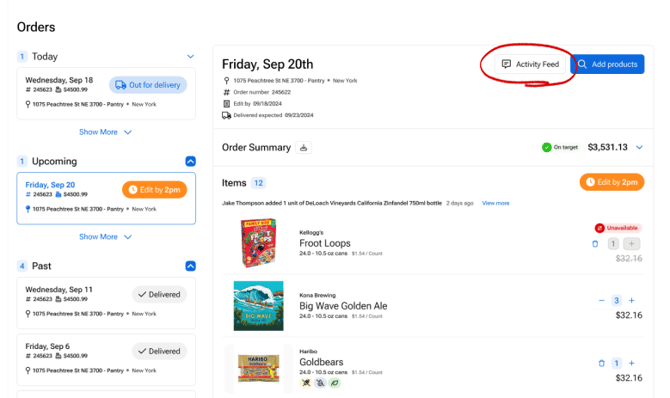
- Type your message in the comment box
.png?width=670&height=439&name=Orders%20-%20Editable%20(1).png)
- Click Send and you'll see the confirmation message that your request was sent
-1.png?width=364&height=245&name=Orders%20-%20Editable%20(2)-1.png)
- If you have additional comments, add them anytime in the individual order's Activity Feed
- You will get notifications via Slack or Email when Crafty responds to your comment, or you can see it directly inside the orders Activity Feed
What Unread Notifications Look Like
- The Crafty team will respond to comments directly in the thread of that order.
- When you have an unread message, the Activity Feed button in that individual order will have a red dot on it.
.png?width=670&height=151&name=Orders%20-%20Editable%20(3).png)
- Once you click on the Activity Feed and read the new comments, that dot will go away.
- This unread feature is unique to each user, so if one person on your team reads the message but another person doesn't, the red dot would still appear on the person who hasn't read that comment yet.
Receiving Notifications in Slack or Email
If you haven't already connected Slack, head over to your Notification Settings, click the Connect Slack button at the top. If you need help, check out our Slack Activation Guide: HERE.- Once the Crafty team responds to your message you will get a notification in Email and Slack (if enabled).

- To view the message, click on View Order Message and it will take you directly into the Activity Feed of that specific order.
- If you have additional comments, you can drop those inside!
Scenarios Where Order Commenting is Most Helpful
- Delivery updates or access instructions: Share important details like building access, delivery notes, or temporary issues such as construction or closures.
- Sharing on-site contact information: Provide the best point of contact for the day, especially if no one will be available to receive the delivery.
- Rescheduling or canceling a delivery: Request changes to upcoming or recurring orders, including cancellations or new delivery dates.
- Coordinating delivery timing for events: Communicate timing needs for events like happy hours or lunch and learns to help ensure delivery aligns with your schedule.
- Questions or notes for your delivery team: Share important instructions or context that may not carry over from previous orders.
FAQs
How will I know when the Crafty team responds?
When a Crafty team member responds, you will be alerted in a few ways. You will receive an email or Slack (if enabled), and inside the Crafty Platform, you will see a notification dot on your order alerting you to your Activity Feed.
Who can leave comments on an order?
Any user with access to the order in the Crafty Platform can leave a comment and view responses.
Where can I see my past messages?
All comments and updates are stored in the Activity Feed on each order, giving you a complete history of communication and changes.
Do I still need to email support?
In most cases, no. Order Commenting is designed to replace email for order-related communication. For urgent or unrelated issues, you can still contact support if needed.