
How is Employee Voting Customizable?
Employee Voting lets your team vote on the office snacks, drinks, coffee, and supplies inside your pantry, with you in complete control. You decide what goes in your pantry, and you also control the voting experience to get the feedback you need.
Here’s how you can customize Employee Voting:
- Voting Limits: Give each employee anywhere from 1 to 10 votes per month in Settings. The default is 5.
- Timeline: You decide when voting runs by when you share your link or post your QR code. Take them down anytime. Your link and QR code never change, so you can reuse them for every collection without reprinting.
- Product-Specific Customizations:
- Category: Show or hide entire categories so voting stays focused on the areas you want feedback on.
- Product: Show or hide specific items, whether that’s due to price, type of product, or whatever your preferences are.
- Collection: Showcase a specific seasonal lineup, like Fall Trends, Halloween, or Black History Month, to add a layer of engagement to your seasonal swaps.
Below, we’ll focus on that last option: how to set up Employee Voting by collection so your team can weigh in on every seasonal swap.
How To Customize Employee Voting by Seasonal Collection?
- Go to My Pantry and select your location
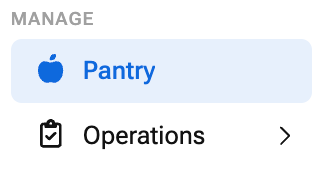
- In the Employee Feedback section, click Settings
Learn how to enable employee voting if you haven't already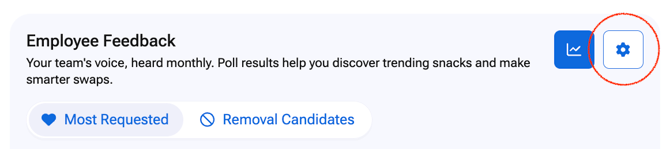
- Click Preview
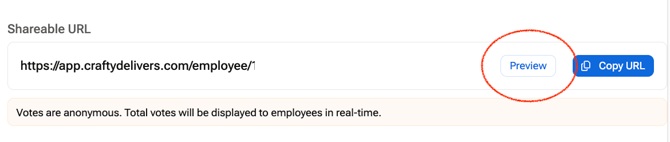
- Close the Begin Voting pop-up
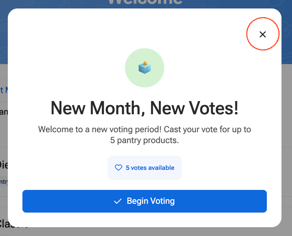
- Click Edit Mode

- Hover over each collection in the left-hand menu, and an eye will appear, and to hide a collection you need to click on the eye so it turns it into an eye with a slash
The eye with a slash means that entire collection hidden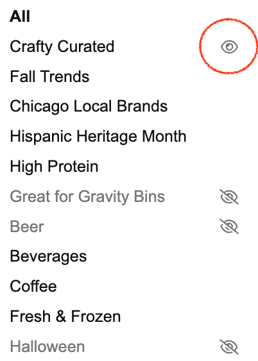
- To only show a single seasonal colletion, make sure all the other collections have an eye with a slash next to them
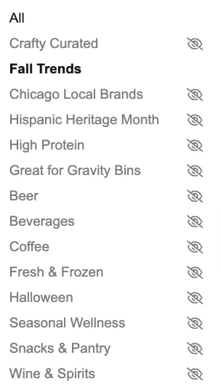
- To hide specific products within the collection, click on the eye icon next to each product to show or hide it


- To view your changes, click Voting Mode to see voting exactly the way your employees will

- To share your voting experience go back to My Pantry > Employee Voting Settings
- Click Copy URL and or Download QR Code Sign to share your voting experience
What Seasonal Collections Can I Feature?
The goal is not to overhaul your pantry, but to make a handful of small swaps that bring in something new while your team’s go-to staples stay put.
- Quarterly Seasonal Collections: Swap in a few trending items each season whether that's protein-picks for the new year, comforting flavors for fall and winter, or light and bright optoins for summer and spring.
- Holiday-Specific Collections: Add a few themed treats for the moments your team celebrates, whether that’s spooky sweets for Halloween, something festive for the winter holidays, or a little something sweet on Valentine’s Day.
- DEI Celebrations: Feature minority-owned brands that honor the cultures behind each observance, whether that’s spotlighting Black-owned brands for Black History Month or bringing in Latin American favorites for Hispanic Heritage Month.
Scenarios Where Seasonal Voting is Most Helpful
When you open voting shapes what the results tell you. Here’s how to time it and put the feedback to work.
- Kicking Off a New Season: Open voting in the first few weeks of a new quarter, whether that’s the start of fall or right before the new year. Use the top-voted items to decide which seasonal picks get a full spot in your next order and which ones to skip.
- Planning Ahead of a Holiday: Open voting a few weeks before Halloween, Valentine’s Day, or your team’s holiday party. Stock the winners in time for the celebration, so the treats your team picked are ready the day they show up.
- Deciding What Sticks Around: Open voting while your holiday or seasonal collection is in the pantry, so your team votes on items they’ve actually tried. Items that earn strong votes are great candidates for a permanent spot, while low-vote items can rotate out when the collection wraps.
Employee Voting Customization FAQs
Should I run voting before or after a holiday?
Both work. Run it before to see what your team wants for the celebration, or after to see which items they want to keep around.
How many votes does each employee get?
Each employee gets 5 votes per month by default. You can change this to anywhere from 1 to 10 in Settings. Votes reset at the start of each month.
Do employees need a Crafty Platform login to vote?
No. Employees scan the QR code or click your voting link, then verify their work email to start voting.
Will voting results change my orders automatically?
No. Employee Voting gives you rankings and insights only. You stay in full control of what gets added or removed from your pantry.
Can each office run a different seasonal collection?
Yes. Employee Voting is set up per location, and voting data stays specific to each office.